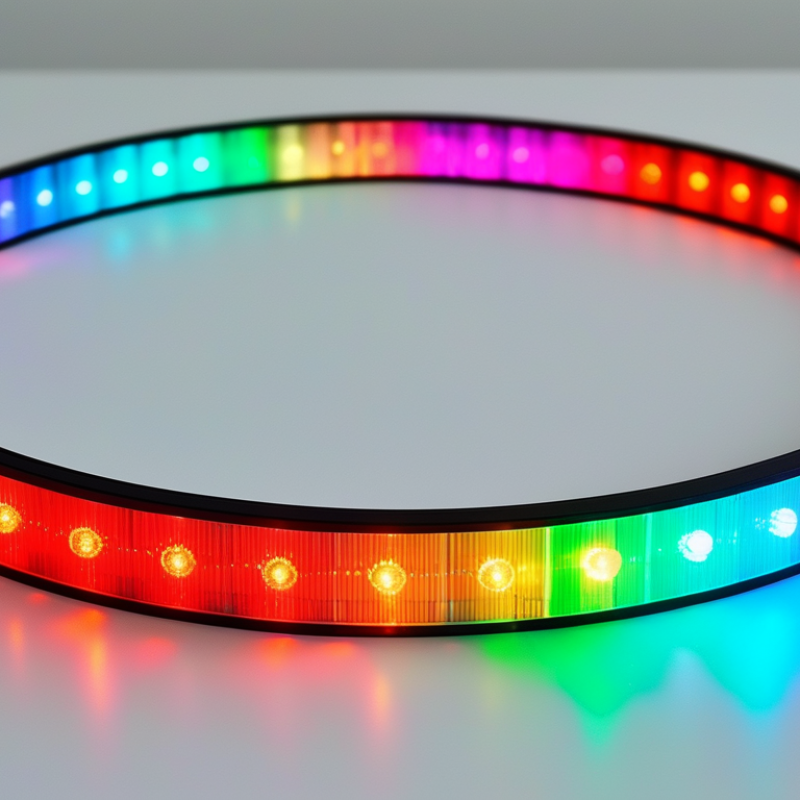
An Rgb Ring Light is more than a colorful lamp for videos or photographs. It combines circular LED lighting with adjustable red, green, and blue color channels. These channels mix different light intensities to create vivid colors, soft pastels, and changing effects.
Inside the housing, LEDs sit around a central opening. This shape helps illuminate the face evenly, reducing harsh shadows beneath the eyes and chin. A diffuser spreads the light across the front surface. It creates a smoother appearance. A controller, remote, or mobile app usually manages brightness, color, speed, and lighting modes.
The working principle is practical. Red, green, and blue light blend in different proportions. Higher red and blue levels may produce purple. Balanced settings can create white light, although quality varies between models. Some ring lights include separate white LEDs with adjustable color temperature. These are often better for accurate skin tones.
That difference matters.
During a video call, a cool white setting can make a room feel clean and bright. During a product shoot, excessive RGB color may distort the item’s real appearance. Reliable testing should examine brightness, color consistency, heat, controls, and power stability. Specifications also deserve attention, especially CRI ratings for natural-looking subjects.
This guide explains how an Rgb Ring Light produces light and why its design affects results. It also considers real shooting conditions, including glasses reflections, background color, and camera exposure. RGB lighting looks impressive, but it is not automatically professional. Sometimes, a simple white setting works better. That limitation is easy to overlook.
An RGB ring light is a circular lighting tool built with light-emitting diodes around a central opening. RGB means red, green, and blue. These three colors combine to create many colored effects. By adjusting their intensity, users can produce purple, cyan, orange, or softer mixed tones. The ring shape spreads light around a subject, reducing harsh shadows on the face.
Most RGB ring lights include separate white-light settings. These settings usually offer warmer or cooler color temperatures for video calls, portraits, and product demonstrations. Colored modes are more useful for backgrounds, mood lighting, or creative scenes. They are not always suitable for accurate skin tones. A bright blue setting, for example, may make skin appear pale or gray on camera.
Controls may include buttons, a remote, or a mobile connection. Good results depend on placement, not only color selection. Positioning the light near eye level creates balanced facial illumination. Moving it closer increases brightness but can reveal skin texture more clearly. That detail can be useful, though not always flattering. Diffusion helps soften the output. Still, inexpensive models may show uneven color around the ring, and camera settings can change the final appearance. Testing the light with the actual camera is more reliable than trusting the built-in color display. The effect takes practice.
What Is an RGB Ring Light and How Does It Work?
An RGB ring light uses light-emitting diodes arranged in a circular frame. Its key component is the LED array. Individual red, green, and blue diodes mix their output to create colored light. By adjusting each channel’s intensity, the controller produces shades such as purple, cyan, or warm orange. The ring shape places light around the camera, reducing harsh shadows beneath the eyes and chin.
A diffuser covers the LEDs and softens bright points. Without it, the subject may see distracting dots reflected in the eyes or glasses. A control panel or wireless controller changes brightness, color, and lighting effects. The power supply converts household electricity into a safer, usable current for the LEDs. A tripod mount adds height adjustment, while a phone or camera holder keeps the lens near the ring’s center. Small design choices matter.
In a home studio, I usually place the ring slightly above eye level and about half a meter away. This creates smooth facial lighting without flattening every feature. RGB colors can look attractive, but they may reproduce skin tones poorly at certain settings. A high color-rendering rating helps, although numbers do not replace real testing. I have also found that inexpensive diffusers can soften light unevenly. That flaw becomes visible on reflective backgrounds. Heat control, stable brightness, and simple controls often matter more than dramatic color effects.
An RGB ring light uses red, green, and blue LED channels to create adjustable color. Each channel emits a different wavelength of visible light. The controller changes their intensity through pulse-width modulation, or PWM. Higher red output creates warmer tones, while stronger blue produces cooler or more dramatic shades.
Color blending follows the additive RGB model. Red and green can form yellow, green and blue can form cyan, and all three channels can create white. However, this white is not always balanced. Its quality depends on the LEDs’ spectral output, not only the selected color value. CIE color science explains why two lights with identical RGB settings may look different on skin or fabric. The U.S. Department of Energy’s Solid-State Lighting research reports continue to identify spectral quality and controllability as important performance goals. Meanwhile, Grand View Research valued the global LED lighting market at approximately $78.93 billion in 2023, showing the technology’s expanding professional use.
Tips: Test colors on camera before filming. Skin can appear gray, overly red, or strangely green. Keep brightness moderate, because maximum output may increase flicker or reduce color accuracy. A light rated only by RGB values can mislead; check CRI or TM-30 data when available. I have found that a visually attractive purple often performs poorly on video. That limitation deserves attention.
An RGB ring light combines red, green, and blue LEDs to produce colored illumination around a central camera opening. By adjusting each color channel, it can create shades from soft violet to vivid cyan. Many models also include white light modes, often with adjustable color temperature. This range helps users shift from warm indoor lighting to cooler daylight. In my experience, accurate skin tones usually require white mode rather than saturated RGB colors.
Controls may include physical buttons, a handheld remote, or a mobile interface. Users can usually change brightness, hue, saturation, and color temperature. Some lights offer preset effects, such as fading, flashing, or gradual color transitions.
These effects can add energy to a background, but they may distract viewers during instructional videos. Keep adjustments small. A few seconds of testing can reveal harsh shadows, uneven skin color, or distracting reflections in glasses.
Customization depends on the light’s diffusion, mounting position, and room surfaces. A diffuser softens facial shadows, while placing the ring slightly above eye level can create more natural modeling. Colored walls may reflect unwanted tints onto the subject. My first setup looked impressive on the preview screen but made skin appear gray in person. I had pushed saturation too far. Reliable results come from checking the actual recording, not only the live display, and keeping a neutral white option available.
An RGB ring light uses red, green, and blue LEDs to create colored illumination around a central camera opening. By adjusting each color channel, it produces mixed hues, such as violet, cyan, or warm amber. Many models also provide white light with adjustable brightness and color temperature. In practice, the ring shape places light near the lens, reducing harsh facial shadows during video calls, tutorials, livestreams, and product demonstrations.
Common uses depend on the subject. Creators may choose a soft purple background for atmosphere, while makeup users usually need balanced white light for accurate skin and cosmetic colors. Small rings suit desks and close-up filming. Larger rings spread light more evenly across the face. A diffuser matters, especially when the LEDs look like sharp dots. It can make skin appear smoother, but excessive diffusion may reduce brightness.
Selection requires more than counting color effects. Check brightness control, color temperature range, adjustable color channels, and stable mounting. High color-rendering performance is important for makeup, food, crafts, and photography. A remote control is convenient, though app controls can sometimes feel slow or unreliable. USB power works for simple setups, while larger lights may need stronger adapters. Test the light at eye level and slightly to one side. Direct exposure can cause discomfort. RGB effects are useful, but they can distract viewers and distort colors. My own preference is often a plain white setting; colorful modes look exciting, yet they are not always practical.
| Data Dimension | Typical Information | How It Works or Why It Matters | Practical Selection Consideration |
|---|---|---|---|
| Definition | An RGB ring light is a circular LED light that can produce white light and a broad range of colored light. | LEDs are arranged around a central opening to provide relatively even illumination around a camera or subject. | Choose a ring light when uniform, front-facing lighting and a compact setup are important. |
| RGB Color Generation | Red, green, and blue LED channels are adjusted independently and mixed at different intensities. | Changing the output of the three color channels creates many additive color combinations. | Look for separate RGB controls and smooth color adjustment if accurate creative color effects are needed. |
| White-Light Mode | White light is commonly produced with dedicated white LEDs or by combining multiple LED channels. | White-light modes are intended for natural-looking illumination, while RGB modes are mainly used for atmosphere and visual effects. | For makeup, product work, or video calls, prioritize adjustable white light before decorative RGB effects. |
| Color Temperature | Many adjustable white-light fixtures cover a warm-to-cool range of approximately 2700–6500 K. | Lower color temperatures appear warmer and more yellow; higher values appear cooler and more blue. | Select a wide adjustable range when the light must match indoor lamps, daylight, or other studio fixtures. |
| Brightness Control | Brightness is usually adjustable from a low output level to the fixture's maximum output. | Dimming controls change the electrical power delivered to the LEDs or use pulse-width modulation to regulate light output. | Choose smooth, flicker-controlled dimming for close-up video, photography, and long recording sessions. |
| Color Accuracy | Color Rendering Index (CRI) describes how faithfully a light reveals colors compared with a reference source. | A higher CRI generally produces more natural-looking colors, especially for skin tones, clothing, and products. | For beauty, food, artwork, or product content, consider white-light performance around CRI 90 or higher when available. |
| Color Effects | Common effects include static colors, gradual fades, color cycles, flashes, and pulsing patterns. | The controller changes RGB channel output over time to create movement or transitions in the light color. | Choose programmable effects when the light will be used for creative backgrounds, live streams, or event scenes. |
| Beam Direction | The circular form directs light toward the subject from a relatively close, frontal position. | Light from around the lens can reduce harsh directional shadows and create a visible catchlight in the eyes. | Use a diffuser or adjustable angle when softer shadows and more control over facial modeling are required. |
| Ring Diameter | Compact models are suitable for desks and phones; larger models generally illuminate a wider area. | A larger emitting surface can spread light more broadly and may produce softer illumination at the same distance. | Match the diameter to the subject size, camera distance, available space, and required portability. |
| Power Source | Ring lights may use mains power, USB power, or an internal rechargeable battery. | Mains power supports continuous operation, while USB and battery operation improve mobility but may limit output or runtime. | Check the required voltage, USB power rating, cable length, and battery runtime before purchasing. |
| Controls | Controls may be located on the fixture, an inline controller, a remote control, or a mobile application. | The control method determines how quickly users can change brightness, color temperature, hue, saturation, or effects. | For solo filming, a remote or app can be more convenient than reaching toward the light during a recording. |
| Smart Features | Some models support wireless control, scene presets, timers, or synchronization with other compatible lights. | Software controls can store settings and coordinate color changes across multiple fixtures. | Confirm wireless compatibility, connection range, operating-system support, and whether key functions work without an app. |
| Common Use: Video Calls | Provides front-facing illumination for online meetings, interviews, and remote presentations. | Even light can reduce strong shadows caused by ceiling lights or windows positioned to one side. | Use a moderate brightness level and place the light slightly above eye level to avoid an overly flat appearance. |
| Common Use: Streaming | Used as key lighting, fill lighting, or colored background lighting for live streams and recorded content. | White light can illuminate the presenter, while RGB output can separate the subject from the background. | Prioritize quiet operation, stable color output, remote controls, and mounting flexibility. |
| Common Use: Makeup and Beauty | Used to illuminate the face during makeup application, hairstyling, skincare, and beauty photography. | Even frontal light helps reveal facial details and reduces deep shadows around the eyes and nose. | Choose high color accuracy, adjustable white light, a diffuser, and sufficient brightness without excessive heat. |
| Common Use: Photography | Suitable for portraits, close-up images, small products, crafts, and tabletop scenes. | The circular light can create a recognizable ring-shaped catchlight and consistent front illumination. | Consider brightness at the intended working distance, diffuser quality, tripod stability, and camera clearance. |
| Common Use: Product Demonstrations | Useful for showing small objects, demonstrations, tutorials, and detail-focused content. | Continuous light allows the user to preview shadows and reflections before taking a photo or recording video. | Use adjustable angles and diffusion to control glare on glossy, metallic, or transparent objects. |
| Common Use: Ambient Lighting | RGB modes can add colored illumination to rooms, stages, displays, and decorative backgrounds. | Color changes influence the visual mood without needing a separate colored filter for every hue. | Evaluate hue range, saturation, effect speed, wireless control, and the light's ability to operate continuously. |
| Flicker Performance | Flicker may become visible in video or cause banding when LED output is poorly controlled. | Power regulation and dimming frequency affect how consistently the light appears to cameras and the human eye. | Look for tested flicker-free performance across the intended brightness range, especially for high-frame-rate video. |
| Heat and Operating Time | LEDs generally produce less heat than many traditional lamps, but continuous operation can still warm the fixture. | Heat management affects comfort, component life, brightness stability, and safe operating duration. | Check ventilation, operating-temperature guidance, thermal protection, and whether the light becomes uncomfortable at close range. |
| Mounting Options | Common mounting arrangements include a desktop stand, tripod mount, adjustable arm, or central camera holder. | Mounting determines the light's height, distance, angle, and compatibility with a camera or smartphone. | Verify thread size, stand load capacity, tilt range, and clearance for the chosen camera or phone. |
| Portability | Smaller USB-powered lights are easier to transport; larger fixtures usually provide broader coverage and greater output. | Portability involves the fixture's size, weight, power source, stand design, and storage requirements. | Choose a compact model for travel and a larger, sturdier model for a permanent studio or frequent production work. |
| Safety Considerations | Use the supplied power equipment, keep ventilation openings clear, and avoid placing the fixture near water or unstable surfaces. | Correct power and stable mounting reduce the risk of overheating, electrical faults, or accidental falls. | Review electrical ratings, protective features, cable condition, stand stability, and the manufacturer's operating instructions. |

Content © 2025 Komatsu. All Rights Reserved